
Red, Green, Refactor: The Red/Green Testing Cycle in TDD

Red, green, refactor (also called red-green testing or red/green TDD) is the loop at the center of test-driven development (TDD): write a test that fails (red), write the least code that makes it pass (green), then improve the code while every test stays green (refactor). Each loop takes a few minutes, and you repeat it for every small piece of behavior.
Kent Beck described the cycle in Test-Driven Development: By Example (2002), and Martin Fowler’s summary of TDD boils it down to the same three steps. The tests are a side effect; the point is that you decide what the code must do before you write it, and you clean it up with a safety net under you.
The red-green-refactor cycle
Red: write a failing test
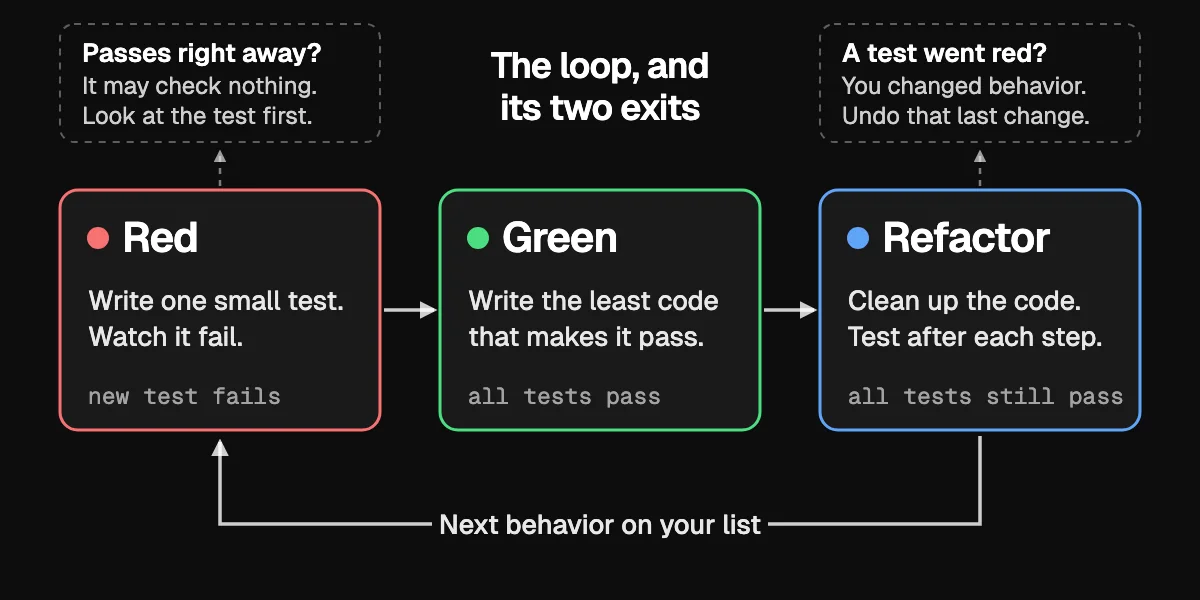
Pick the smallest next piece of behavior and write one test for it. Run it and watch it fail. The failure proves two things: the behavior doesn’t exist yet, and the test can fail at all. A test that passes before you’ve written the code is checking nothing.
Kent Beck’s later Canon TDD (2023) adds a step before this one: write down a list of the test cases you expect to need, then turn them into real tests one at a time.
Green: make it pass with the least code
Write the simplest code that turns the test green. If returning a constant passes it, return a constant; the next test will force the real logic. This isn’t the time for design or for features the test doesn’t ask for.
Refactor: clean up while the tests stay green
Now improve the code: rename, extract functions, remove the duplication you added to get to green. That’s refactoring in Martin Fowler’s sense of the word: changing a program’s internal structure without changing its external behavior. Run the tests after each small change. If they stay green, you haven’t changed what the code does. Refactor the tests too when they get repetitive. What to clean up first is usually a code smell: duplication, a long function, a name that no longer fits.
| Phase | Goal | What you do |
|---|---|---|
| Red | Define the next requirement | Write one small test and watch it fail |
| Green | Meet the requirement | Write the simplest code that passes |
| Refactor | Keep the code clean | Improve the design; tests stay green |
The table leaves out the two moments when the loop tells you something went wrong. A new test that passes straight away means the behavior already exists or the test checks nothing, so look at the test before you write any code. A test that goes red during the refactor means you changed behavior, so undo that last change and try a smaller one.
A worked example in Python
We’ll build a User class with one rule: the email address must look valid. The example uses Python’s built-in unittest; the loop is the same with pytest, Jest, Vitest or JUnit.
Cycle 1, red: a user has an email
# test_user.py
import unittest

from user import User


class TestUser(unittest.TestCase):
    def test_creates_user_with_email(self):
        user = User("test@example.com")
        self.assertEqual(user.email, "test@example.com")


if __name__ == "__main__":
    unittest.main()
Run it:
python -m unittest
It fails with ModuleNotFoundError: No module named 'user'. That’s red.
Cycle 1, green: just enough code
# user.py
class User:
    def __init__(self, email):
        self.email = email
Run the tests again. They pass: green. (Going strictly, you’d first add an empty class User: pass, see a TypeError because it takes no arguments, then add __init__. Steps that small feel slow at first and fast once they’re a habit.)
Cycle 2, red: reject an invalid email
Nothing stops User("not-an-email") yet, so the next test asks for that:
    # add to TestUser in test_user.py
    def test_rejects_invalid_email(self):
        with self.assertRaises(ValueError):
            User("not-an-email")
It fails with AssertionError: ValueError not raised. Red again.
Cycle 2, green: add the check
# user.py
import re


class User:
    def __init__(self, email):
        if not re.match(r"[^@]+@[^@]+\.[^@]+", email):
            raise ValueError("Invalid email format")
        self.email = email
Both tests pass.
Refactor: pull the check out
The validation is buried in the constructor. Move it into a function with a name that says what it does:
# user.py
import re

EMAIL_PATTERN = re.compile(r"[^@]+@[^@]+\.[^@]+")


def is_valid_email(email):
    return EMAIL_PATTERN.match(email) is not None


class User:
    def __init__(self, email):
        if not is_valid_email(email):
            raise ValueError("Invalid email format")
        self.email = email
Run the tests: still green. The structure changed and the behavior didn’t. That’s one full red-green-refactor cycle, twice over. The next test on your list might be “email is stored lowercase”, and the loop starts again.
Common TDD mistakes
Tests that check too much
A test called test_user_creation_and_login fails for several possible reasons, so a red result doesn’t tell you where to look. Split it into tests that each check one behavior:
test_user_can_be_created_with_valid_datatest_login_succeeds_with_correct_passwordtest_login_fails_with_wrong_password
Skipping the refactor
Red, green, next feature, and the quick fixes pile up. The code works and the tests pass, but each change gets harder. The refactor step is where TDD pays for itself: after each green, look for duplication and unclear names before writing the next test.
Testing the implementation instead of the behavior
A test that asserts sort() called a private quick_sort_helper breaks the moment you change the algorithm, even though the results are still right. Test what callers see: give sort() an unsorted list and check the list it returns. Tests on behavior let you refactor; tests on internals stop you.
Writing the code first
“I’ll write the test after” usually means a test shaped around whatever the code happens to do, or no test. Writing the test first makes you use your own API before it exists, which is when awkward interfaces are cheapest to fix.
TDD with your test runner and CI
Use your stack’s standard runner: pytest for Python, Vitest or Jest for JavaScript and TypeScript, JUnit for Java, xUnit or NUnit for .NET, go test for Go. Run it in watch mode while you work (vitest watches by default; jest --watch does the same) so every save shows red or green within seconds.
Then make CI run the full suite on every push and pull request, and block merges while it’s red. A green run on your machine is only proof for your machine; CI catches the test that depends on your local setup. If you’re choosing a CI service, see our comparison of CI/CD platforms.
When a test stays red and the failure message doesn’t explain why, run that one test under a debugger. Debug Test in VS Code stops on breakpoints in the test and in the code it calls.
Coverage reports show which code no test runs. Use them to find untested business logic, not as a target: chasing 100% produces tests for getters and generated code that never catch anything.
TDD with AI coding agents
TDD fits coding agents well, because a failing test gives the agent something it can check its own work against. Anthropic’s Claude Code best practices say the same: give the agent a check it can run, and for a bug, ask it to “write a failing test that reproduces the issue, then fix it”.
Agents also take this as a one-line instruction. Simon Willison’s guide to agentic engineering calls “Use red/green TDD” a “pleasingly succinct way to get better results out of a coding agent”, since good models read it as: write the tests first and confirm they fail before implementing. Notice that the shorthand stops at passing tests, and agents tend to stop there too. Matt Pocock’s /tdd skill dropped its refactor phase in June 2026 because agents almost never performed it, and moved refactoring into its code-review skill. Martin Fowler names neglecting the third step as the most common way he hears of TDD going wrong, so don’t assume it happened. Step 4 below is the one to ask for by name.
A workflow that holds up:
- Write the tests first, or have the agent write them from examples. Name concrete cases:
user@example.comis valid,invalidis not,user@.comis not. - Run them and confirm they fail for the right reason.
- Commit the tests. Then ask the agent to make them pass without changing the tests.
- Review the diff and refactor, by hand or with the agent, keeping the suite green.
Watch for agents that edit or delete a test to get to green, tests that mock so much they test nothing, and tests that pin down today’s buggy behavior. Committing the tests before the implementation makes the first problem easy to spot in the diff.
In our own repositories, 93% of the 221 bug-fix pull requests written by coding agents changed a test file. That counts a test in the diff, so it can’t tell you whether the test went red first; committing the tests before the code, as in step 3, is what makes that visible. Zest shows which agents and models each engineer uses, Codex and Claude Code included, and the pull requests they lead to.
Emily Bache, a long-time TDD coach, tries the cycle with an agent in this talk:
Frequently asked questions
What is red-green testing in software?
It’s the first two steps of the TDD cycle, named after the colors a test runner shows: red for a failing test, green for a passing one. You write a test and watch it go red, then write code until it goes green. Add the cleanup step and you have the full cycle. It isn’t a separate kind of testing.
Is red-green development the same as test-driven development?
Yes, it’s another name for the same practice, taken from the two colors a test runner shows. You may also see red, green, blue, because a test runner has no color for the third step and some tools, like this JetBrains plugin, draw refactor in blue. All of these names describe one loop.
What is the point of red-green-refactor?
Design first, tests second. Writing the test first makes you decide what the code should do and how it will be called. The loop keeps each step small, and the refactor step keeps the code clean as it grows. In the best-known industrial study, four teams at Microsoft and IBM that adopted TDD saw pre-release defect density fall by 40–90% compared with similar projects that didn’t (Nagappan et al., 2008).
Does TDD slow you down?
At first, yes. The teams in the same study estimated that TDD added 15–35% to initial development time. The return comes later: fewer defects, and changes you can make without fear because the tests tell you at once what broke.
Can I use TDD on a legacy project?
Yes, one change at a time. Before touching untested code, write characterization tests that pin down what it does today, quirks included (Michael Feathers’ Working Effectively with Legacy Code is the standard guide). Then fix a bug the TDD way: a failing test that reproduces it, the fix, a refactor.
What’s the difference between TDD and unit testing?
Unit testing is writing tests for small pieces of code, at any time. TDD is a way of working where the test comes first and drives the code. TDD produces unit tests; writing unit tests after the code isn’t TDD.
Is red-green-refactor only for unit tests?
No. The same loop works with an integration or end-to-end test as the outer red: write a failing acceptance test for the feature, then drive the pieces with smaller red-green-refactor loops until it passes.
Zest is AI coding analytics for engineering teams: it shows which coding agents, models and skills each engineer uses, what they cost, and which sessions end in merged pull requests. See how Zest works.