Claude usage tracker for Claude Code and claude.ai.
Claude shows your five-hour and weekly limits in Settings > Usage on claude.ai and with /usage in Claude Code, and both draw on one shared limit. For a live meter or a usage history, add a Claude usage tracker: Claude Status Bar, Claude Code Usage Monitor or ccusage.
Free for 3 seats · No credit cardStarter covers 3 seats · Pro is $49 a month for 5 · The demo needs no signup
01See your team’s AI stack
Winding /Teams Last 30 days
Zest
3 Members 1 Agent
Team overview
67%
AI Adoption▲ 34 pts
240
PRs Merged▲ 101
96.1h
Median AI Time▲ 9.5h
57.2h
Build Hours▲ 20.3h
This week
Member
AI
PRs/wk
AI Task
Plan
Impl
Last Standup
AI Stack
22.8/wk
28 min ago
15.8/wk
12 min ago
4/wk
Aug 14
—
2 hours ago
Current AI models & harnesses As of Sep 8
Claude CodeFable 5.1 (max) (with fallback)70.4 · Coding Agent Index
CodexGPT-6 Astra (max)67.0 · Coding Agent Index
Muse CodeMuse Spark 1.3 (xhigh)64.2 · Coding Agent Index
Grok BuildGrok 4.5 (high)64.1 · Coding Agent Index
Kimi Code CLIKimi K362.6 · Coding Agent Index
OpencodeGemini 3.8 Flash (high)61.2 · Coding Agent Index
Cursor CLIComposer 2.5 Fast38.3 · Coding Agent Index
Demo setups use current model families. The pairings above are the combinations benchmarked by Artificial Analysis; rankings measure performance, not popularity.
Illustrative daily trends · Other totals: last 30 days. Build Hours: this week, model-estimated activity including overlap; not engineer hours.
USED BY ENGINEERING TEAMS AT
Not starting today? What's in the way?
How to check your Claude usage limits
Claude's paid plans meter usage in two windows: a session limit that resets every five hours, and a weekly limit. Anthropic counts claude.ai, Claude Code and Claude Desktop against the same limits, so a tracker that reads only one of them can show room you no longer have.
The five-hour window starts with your first message, and the limit resets in full five hours later. A tracker can show when that happens but can't bring it forward, and the next window opens only when you send another message. Weekly limits reset at a fixed day and time assigned to your account, no matter when you started using Claude. Verified Ultra accounts have no five-hour limit.
On the free plan, Anthropic documents a session limit that resets every five hours and a message allowance that varies with demand. Its guide to the usage page names only the paid plans, so on a free account count on Claude's notice when you reach the limit, or on one of the browser extensions below that list free accounts as supported.
Anthropic shows your usage in three places:
Settings > Usage (claude.ai/settings/usage), on the web and in Claude Desktop: a bar for the current session with the time left in it, bars for the weekly limits with their reset day, and any usage credits with the monthly spend limit you set. On a usage-based Enterprise plan it shows consumption instead.
/usage in Claude Code: the same plan bars on Pro, Max, Ultra, Team and Enterprise, the session's tokens per model with a cost estimated at list price, and what used your limits over the last 24 hours or 7 days, by skill, subagent, plugin and MCP server. That breakdown comes from this machine's history, not from your other devices or claude.ai.
The Usage page in the Claude Console, for API keys: Anthropic's docs call it the authoritative bill, where Claude Code's own cost figures are estimates.
Which Claude usage tracker to use
How much a meter matters depends on how often you reach a limit. On our team, across one engineer's 318 Claude Code sessions (September 4 to October 3, 2026), limit notices showed on 16 of 29 active days and in 78 of the sessions (25%), mostly the five-hour limit. That is one heavy user, not a benchmark, but at that rate a live meter earns its place on screen. If a limit notice is rare for you, Settings > Usage is enough.
Pick a tracker by the question it answers: how much is left right now, where the tokens went, or how the whole team uses Claude. Owners on a Team plan already have part of that last answer in Claude Team analytics.
Read on each project's README, Anthropic's Claude Code docs and the Claude Help Center on October 22, 2026; Usage4Claude and ClaudeMeter on November 8, 2026.
Tracker
What it shows
Where it reads
Cost
Settings > Usage
Five-hour and weekly limit bars, reset times, usage credits
Your Claude account, every surface
Built in
/usage in Claude Code
Plan bars, session tokens and cost, what used the limit
Your account for the bars, this machine for the rest
Built in
Status line rate_limits
Five-hour and weekly percent used and reset times, live
Claude Code, on Pro and Max
Built in, with your own script
Claude Status Bar
Limit bars and reset countdowns in the status line, plus a desktop panel on macOS
Claude Code on this machine
Free, MIT license
Claude Code Usage Monitor
A live terminal meter with a forecast of when you run out
The status line's limits, else local estimates
Free, MIT license
ccusage
Tokens and estimated cost by day, week, month, session and 5-hour block
Local logs of Claude Code and 17 other coding agents
Free, MIT license
Claude Usage Tracker
Estimated tokens per claude.ai conversation
claude.ai in Chrome or Firefox
Free, GPL-3.0 license
Usage4Claude
Five-hour, seven-day and per-model weekly limits in the macOS menu bar, for Claude and Codex
Your account, after a browser sign-in
Free, MIT license
ClaudeMeter
Session and weekly limits on Android, with a home screen widget and alerts
Your claude.ai account
Free, with ads
Claude Code analytics
Active users, lines accepted, accept rate, lines per member
Your Team, Enterprise or Console organization, daily
Built in
Zest
Each engineer's sessions, tokens, cost and limit use, next to merged pull requests
A plugin on each engineer's machine, plus GitHub
Free for 3 seats
Claude usage monitor: a live meter for the five-hour limit
Claude Code hands every status line command a rate_limits object with the five-hour and weekly windows: the percent used, from 0 to 100, and when each one resets. It fills those two windows only for Pro and Max subscribers, after a session's first response, and behind a Claude apps gateway it carries your spend limit instead, so on a Team or Enterprise seat read /usage. The Claude Code status line guide has a recipe that prints the five-hour figure.
Two open-source tools build a fuller meter on the same numbers. Claude Status Bar draws five-hour and seven-day bars with reset countdowns and a projection to the end of each window, and adds a floating panel for the Claude desktop app on macOS. Claude Code Usage Monitor runs in a terminal of its own: it reads the official limits through the status line, falls back to local estimates it labels as estimates, and forecasts when you will hit the limit. Its default plan learns your limits from the last 8 days of sessions.
uv tool install claude-monitor
claude-monitor  # or cmonitor, ccmonitor for short
Claude Code usage history and cost with ccusage
Can you see your Claude usage history? Only in part from Anthropic. Settings > Usage shows the windows you are in now, and /usage adds activity stats and a breakdown of the last 24 hours or 7 days. For a record that reaches further back, use a tool that keeps one.
ccusage answers where the tokens went. It reads the Claude Code session history on your machine and prints tokens and an estimated cost by day, week, month or session, with a per-model breakdown, and its blocks report groups Claude Code's usage into 5-hour windows. The same tool reads Codex, Gemini CLI, GitHub Copilot CLI and 14 more agents, and --json hands the numbers to your own scripts.
Once you know where the tokens went, Claude Code token usage covers how to cut them. Every local tracker has two blind spots. Its cost is a list-price estimate, while a subscriber pays for the seat (Claude Code pricing has what each plan includes). And it sees one machine: usage on claude.ai, on a second laptop or under a teammate's account isn't in its numbers. Claude Code also clears transcripts older than 30 days by default, which caps how far back a local report goes; Claude Code Usage Monitor's opt-in warehouse keeps its own history.
npx ccusage@latest                       # every agent it finds, by day
bunx ccusage claude monthly --breakdown  # Claude Code by month, per model
Claude usage tracker extensions for claude.ai chats
Chats on claude.ai draw on the same limits, but the Claude Code trackers above don't see them. Settings > Usage is the official view, and it is where Anthropic's occasional free limit reset appears: eligible plans sometimes get a Reset for free button that refills the five-hour or weekly limit, usable on the web or in Claude Desktop but not from Claude Code in a terminal.
The Claude Usage Tracker extension for Chrome and Firefox estimates the tokens behind each chat: uploaded files, project knowledge, your preferences, message history, system prompts and most connectors. It can't count web search results or Research, which run on Anthropic's side. To sync across devices it reads your organization ID from claude.ai and keeps usage in Firebase, so read its privacy policy before you install it on a work account. Its author also publishes a macOS and Windows installer that adds the extension to Claude Desktop, an unofficial modified build of the app that the author says you run at your own risk.
Other extensions show the limits themselves rather than estimate tokens. One with nearly the same name, Claude Usage Tracker (Chat Export), puts the five-hour and weekly limits in claude.ai's sidebar, refreshes them about every 30 seconds and can alert you at a threshold you set; its Chrome listing says it collects no data. Claude Usage Meter, from SelectorsHub, shows session and weekly progress with reset times in a strip above the chat box and sends desktop notifications at the percentages you choose. Both list free accounts as supported.
Claude usage trackers for the menu bar and your phone
Two apps keep the numbers in view outside the terminal. Usage4Claude is an open-source menu bar app for macOS 13 or later that reads your Claude account's limits across claude.ai, Claude Code, desktop and mobile: five-hour, seven-day, extra usage and weekly use per model. Sign-in runs in your browser, tokens stay in the macOS Keychain, and it tracks Codex too. For Codex's own views, see the Codex usage dashboard guide.
ClaudeMeter is an unofficial Android app with a home screen widget, alerts before you hit a limit and background refresh. It shows session and weekly limits and, by its store listing, keeps data on the device and talks only to claude.ai. It contains ads.
On Windows, Settings > Usage works in Claude Desktop, and Claude Status Bar installs from PowerShell, though its floating panel is macOS only. For a meter that stays on screen, Session Usage Widget is an always-on-top window and tray icon for the five-hour and weekly limits, and AI Usage Monitor adds a history by day, week, month and year. Both are free in the Microsoft Store, neither comes from Anthropic, and both need Claude Code installed and signed in on that PC.
Tracking Claude usage for a team
Team and Enterprise owners, and Console admins, get Claude Code analytics: daily active users and sessions, lines accepted and the accept rate, the top commands, and each member's lines accepted this month, exportable as a CSV. A Value tab turns those into an estimated productivity lift and a cost per commit, with every formula editable. The numbers refresh once a day and reset each month, and they include no per-engineer tokens or limit use; the API and OpenTelemetry routes to those are on the Claude Code usage dashboard guide.
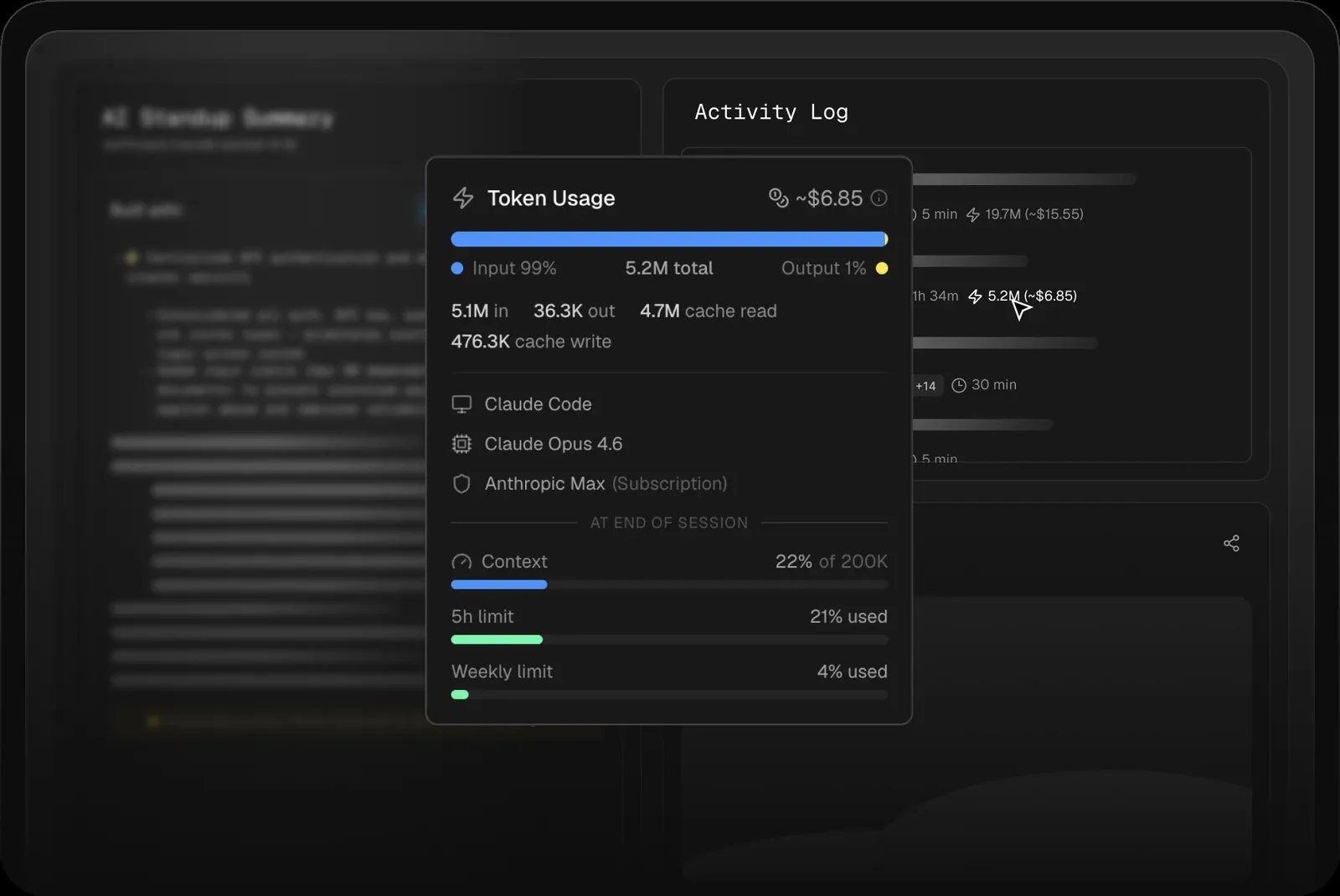
Zest is the per-engineer view across tools. Each engineer installs the plugin (setup), and every Claude Code session lands on the team dashboard with its models, tokens and list-price cost, the five-hour and weekly limit use the status line reported, and the pull request it led to. Zest's status line passes through one you already run, such as Claude Status Bar's, and Codex and Cursor sessions sit on the same dashboard.
What Zest doesn't do: draw a live meter while you work, or count claude.ai chats, which use the same limits. Its limit figures come from Pro and Max accounts only, because those are the accounts Claude Code reports them for.
Token usage for one Claude Code session in Zest
Is anyone monitoring Claude Code usage in production?
Yes. An admin can turn on Claude Code's OpenTelemetry export for every engineer through managed settings, and public Grafana dashboards are built on those metrics. One community dashboard charts sessions, tokens, estimated cost, lines of code, commits and pull requests. Treat the cost as an estimate: on a subscription, the bill is the seat.
TRY IT ON YOUR TEAM
See what your team ships with AI.
Starter is free (3 seats, no credit card). Pro is $49 a month with 5 seats and Max is $149 a month with 10 seats — priced per workspace, not per engineer, with extra seats at $19 a month. See pricing
Yes. Settings > Usage on claude.ai and in Claude Desktop shows your five-hour and weekly limits with their reset times, and /usage shows the same bars inside Claude Code, along with what used them.
Does Claude Code count against my claude.ai usage limit?+
Yes. Anthropic counts claude.ai, Claude Code and Claude Desktop against the same usage limits (checked October 22, 2026).
Why doesn't my status line show my Claude limits?+
Claude Code sends the five-hour and weekly fields only to Pro and Max subscribers, and only after a session's first response; behind a Claude apps gateway it sends your spend limit instead. On a Team or Enterprise seat, or with an API key, use /usage.
Is there a Claude usage tracker for desktop or a phone?+
Settings > Usage works in Claude Desktop, and Claude Status Bar adds a floating panel for it on macOS. For a meter that stays in view, Usage4Claude sits in the macOS menu bar and ClaudeMeter puts a widget on an Android home screen.
Can I track Claude usage for my whole team?+
Team and Enterprise owners get Claude Code analytics with active users and lines accepted per member. For each engineer's sessions, tokens and limit use next to their pull requests, install the Zest plugin on each machine and connect your GitHub org.


 Winding / Teams